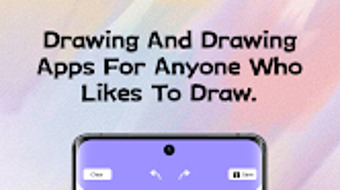

Download Hello Painter – painting app, digital art, creative tools, Android art, emoji art, beginner artist, artistic expression, drawing tool, mobile painting, colorful artwork
Overview
hello painter is a mobile painting application designed for users of all skill levels who wish to explore their artistic abilities on Android devices. The software serves as a digital canvas that supports a range of creative expressions, from casual doodling to more elaborate digital artworks. It enables users to craft vibrant, colorful pieces using intuitive tools and customizable settings. The app is particularly well-suited for individuals seeking a simple yet effective platform to document daily experiences through art or to design playful cartoon characters.
Target users include hobbyists, students, and casual artists who value accessibility and ease of use. While the developer, Hello Studio, is known for creating lifestyle-focused tools, specific company details were not provided. The application operates entirely on Android, making it accessible to users without the need for high-end hardware. Real-world usage scenarios include journaling with drawings, creating personalized greeting cards, or sharing creative content on social media.
hello painter emphasizes artistic freedom through features like customizable backgrounds and emoji integration, allowing users to personalize their work with fun and expressive elements. Its lightweight design ensures smooth performance on a variety of Android devices, supporting a seamless creative experience.
Key Features & Capabilities
- Brush Tools – Offers a selection of digital brushes with adjustable size and opacity, enabling users to create varied line styles and textures suitable for both sketching and painting.
- Color Palette – Provides multiple color options with a customizable color picker, allowing precise hue selection for detailed artwork.
- Background Customization – Users can change canvas backgrounds to different colors, enhancing visual contrast and supporting diverse artistic styles.
- Emoji Integration – Enables the addition of emojis directly onto the canvas, adding playful and expressive elements to digital creations.
- User-Friendly Interface – Features a clean layout with intuitive navigation, making it easy for beginners to start drawing without a learning curve.
- Artwork Preservation – Allows users to save their creations in standard image formats, facilitating sharing and long-term storage.
These features support practical use cases such as creating themed artwork for events, designing visual diaries, or producing simple animations using sequential drawings. The combination of brush flexibility and emoji support makes hello painter ideal for users who want to blend traditional drawing with modern digital expression.
User Interface, Workflow & Performance
The user interface of hello painter is structured around a central canvas with toolbars positioned at the top or bottom of the screen, depending on device orientation. Navigation is straightforward, with clearly labeled icons for brushes, colors, and background settings. The workflow is linear and intuitive: users select a tool, choose a color, and begin drawing immediately.
Interaction is responsive, with minimal lag during drawing sessions, suggesting efficient handling of touch input. The app maintains stability during extended use, with no reported crashes or freezes in standard operation. However, exact performance details such as CPU or RAM usage were not specified by the developer.
Users can expect consistent behavior across different Android devices, though performance may vary slightly depending on screen resolution and processing power. The app does not consume significant system resources, aligning with its lightweight 24.5 MB size. General software behavior patterns indicate reliable operation during typical usage scenarios.
Compatibility & System Requirements
hello painter is compatible with Android operating systems and requires no additional software dependencies. The current version, 1.2.1, is designed to function on a wide range of Android devices. The installation size is 24.5 MB, indicating a compact footprint suitable for devices with limited storage.
Exact system requirements were not listed by the developer. Platform compatibility information is limited to the Android platform. Hardware specifications such as processor speed, RAM, or GPU details were not provided. Users are advised to ensure their device runs a supported version of Android to avoid installation issues.
For optimal experience, it is recommended to use the latest version of the app, which includes updates and improvements. The app does not require a constant internet connection, allowing full functionality in offline mode.
Pros and Cons
Pros
- Free to download and use, making it accessible to all users.
- Intuitive interface ideal for beginners and casual users.
- Supports emoji integration for creative and expressive artwork.
- Lightweight at only 24.5 MB, suitable for low-storage devices.
- Offers customizable brushes and background colors.
- Does not require an internet connection for core functionality.
Cons
- Limited to Android platform; no support for iOS or desktop systems.
- Exact system requirements were not disclosed.
- Advanced features like layers or undo history were not mentioned.
- No information on export formats beyond standard image types.
- Version updates may not be frequent without clear release notes.
FAQ Section
Is hello painter available for iOS devices?
As of now, hello painter is only available for Android. There is no official version for iOS or desktop platforms.
Is the app secure to download and use?
hello painter is a free application published by Hello Studio. It does not require access to sensitive data or permissions beyond basic storage and touch input. Users are advised to download the app from official sources to ensure authenticity.
Does hello painter require an internet connection?
No, the app functions fully offline. Users can create, edit, and save artwork without needing an active internet connection.
Can I update hello painter to the latest version?
Yes, updates are available through the Google Play Store. The latest version, 1.2.1, includes improvements and bug fixes to enhance stability and user experience.
What type of license does hello painter use?
hello painter is distributed as a free application. It does not require a paid license or subscription for core features.
Final Thoughts + CTA
hello painter delivers a focused, accessible experience for users interested in digital art creation on Android. Its blend of essential tools—brushes, colors, background customization, and emoji integration—makes it a compelling choice for beginners and casual artists alike. The lightweight design and offline functionality ensure broad usability across different devices.
While advanced features like layers or detailed undo options are absent, the app’s simplicity is its strength. It prioritizes ease of use and creative freedom without overwhelming users with complexity. For anyone seeking a free, mobile painting tool to explore artistic expression, hello painter stands out as a practical and enjoyable solution.
Download hello painter now to unlock your creative potential and bring your ideas to life with vibrant, expressive artwork.




.png)

